Showing posts with label Software. Show all posts
Showing posts with label Software. Show all posts
"8-Step to Install Office 2007 Successfully"
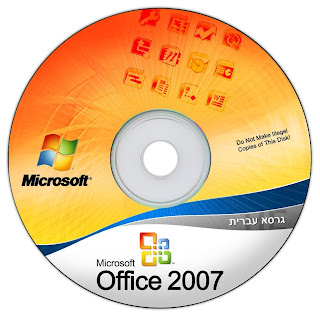
1. Before start to install Office 2007, write down the product key shown on the top of the CD in a paper.
2. Insert the Microsoft Office 2007 Installation CD/DVD into your computer CD/DVD-ROM drive. After a few seconds, the Office 2007 setup screen will appear.

"10-Step to Install Microsoft Office 2003 Successfully"

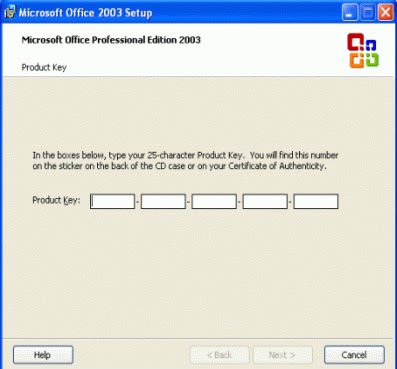
1. Before start install Microsoft Office 2003, write down the product key shown on the top of the CD on a piece of paper.
2. Insert the Microsoft Office 2003 Installation CD into your computer CD drive. After a few seconds, the Office 2003 setup screen will appear.

Caps Lock Changer Ver 1.0
If you often accidentally press the caps lock during typing like me here, you can completely disable it using Caps Lock Changer. Alternatively, still with the same application, you can make it useful by changing it to other key like underscore, tab, enter, esc, delete, backspace, home, insert, and many other keys. After you apply the changes, it will sit in your tray and run in the background.
If you often accidentally press the caps lock during typing like me here, you can completely disable it using Caps Lock Changer. Alternatively, still with the same application, you can make it useful by changing it to other key like underscore, tab, enter, esc, delete, backspace, home, insert, and many other keys. After you apply the changes, it will sit in your tray and run in the background.


Caps Lock Changer is free, works under Windows XP /

WinScan2PDF
WinScan2PDF is a simple tool that allows you to scan documents from your scanner and save them as PDF files. The program also supports scanning of multiple pages, which will then be combined into a single PDF document. Useful if your scanner software does not offer PDF conversions. Standalone software, no installation....


READ MORE
WinScan2PDF is a simple tool that allows you to scan documents from your scanner and save them as PDF files. The program also supports scanning of multiple pages, which will then be combined into a single PDF document. Useful if your scanner software does not offer PDF conversions. Standalone software, no installation....
Click to here to download the file
USB Safely Remove is a utility for effortless and speedy disconnection of any removable devices. Not only does it save time, but it ensures that all data remains on a device when it is unplugged. Safely Remove is a system utility designed for quick and safely stopping USB Flash Drives connected to your computer. With this utility you can safely stop and remove USB Flash Drives much faster then using "Safely remove hardware"" icon in the system tray.
FEATURES:
Dislike reading boring documentation, but interested in one of the following things?
READ MORE
FEATURES:
- Unlimited number of processes to launch You may specify to launch any number of processes for specified event. For example you may setup launching a backup of the drive before stopping and following disomounting of a TrueCrypt volume
- Optional command line parameters You may pass such device parameters as drive letter, drive label, device PNP name into the process command line via parameter templates (e.g. this command line will browse a drive in Explorer on device connection: explorer.exe %DriveLetter%)
- New events to launch programs Now programs can be launched after device plugging, before device stopping, after device stopping and after device removing
- Global autorun You can setup a program to be launched not only for certain device, but for all hotplug devices in the system
Dislike reading boring documentation, but interested in one of the following things?
Browsing a drive with Explorer or Total Commander on device connection
- Scanning a device for viruses on its connection
- Making automatic backup of a flash-drive folder
- Automatic mounting and dismounting a TrueCrypt volume stored on a device
CD Autorun Creator 6.6 | 7.5 MB
CD Autorun Creator - create professional autorun programs for your CD or DVD in visual environment. CD Autorun Creator offers the fast and efficient way to build autorun programs. You can build your own CD/DVD autorun programs within few minutes.

All you have to do is to import your favorite media files such as MP3s and photos in CD Autorun Creator, set command buttons, splash and exit screens, set effects etc...CD Autorun Creator is a software that can create cdroms and autorun programs.
Whether you are creating an autorun CD-ROM or DVD-ROM, CD Autorun Creator will generate all the necessary files for you. Burn them straight to CD-ROM or DVD-ROM and they will automatically start when inserted.
The program is very easy to use and will allow you to create powerful standalone autorun program for your CD-ROM or DVD-ROM in an extremely short time.

READ MORE
CD Autorun Creator - create professional autorun programs for your CD or DVD in visual environment. CD Autorun Creator offers the fast and efficient way to build autorun programs. You can build your own CD/DVD autorun programs within few minutes.

All you have to do is to import your favorite media files such as MP3s and photos in CD Autorun Creator, set command buttons, splash and exit screens, set effects etc...CD Autorun Creator is a software that can create cdroms and autorun programs.
Whether you are creating an autorun CD-ROM or DVD-ROM, CD Autorun Creator will generate all the necessary files for you. Burn them straight to CD-ROM or DVD-ROM and they will automatically start when inserted.
The program is very easy to use and will allow you to create powerful standalone autorun program for your CD-ROM or DVD-ROM in an extremely short time.
eXtra Buttons lets you add up to 9 additional buttons to the title bar of each window, which allow you to minimize the window to the tray, keep it on-top, send it to the background, adjust the window's transparency and more.
There are three options for minimizing windows, you can add them to the system tray as icon, add them to a common tray icon (launch menu) or minimize them as icons to your desktop, keeping your system tray and taskbar less cluttered.


READ MORE
There are three options for minimizing windows, you can add them to the system tray as icon, add them to a common tray icon (launch menu) or minimize them as icons to your desktop, keeping your system tray and taskbar less cluttered.


If you don't need all these options, you can choose to remove the buttons you don't want. All options are also available if you right-click on the title bar of a window. eXtra Buttons works with all Windows Explorer windows and many third party applications.
Click to Download
Create and play scramble puzzles using your own pictures.
Any Picture Scramble lets you create and play scramble puzzles with your own pictures or photos. Create scramble puzzles using pictures of your loved ones, or your favorite scenery!
It's extremely easy to use, so start having fun now!
Summary of features

READ MORE
Any Picture Scramble lets you create and play scramble puzzles with your own pictures or photos. Create scramble puzzles using pictures of your loved ones, or your favorite scenery!
It's extremely easy to use, so start having fun now!
Summary of features
- Use your own pictures in BMP, JPEG or PNG formats
- Customize the number of tiles to split a picture
- Record your time and moves to solve the puzzle
- See original picture during a game


Click Download button to download the file Any Picture Scramble
The free web content control software that block acess to any website on your computer.
Any Weblock is a web content control software that gives you the power to block any website on your local computer. It works with any web browser and displays a fake error page. No network knowledge required to configure. You only need to know the domain/subdomain names of the websites to be blocked.


READ MORE
Any Weblock is a web content control software that gives you the power to block any website on your local computer. It works with any web browser and displays a fake error page. No network knowledge required to configure. You only need to know the domain/subdomain names of the websites to be blocked.


Possible uses include parental control (porns, online games or chat rooms) and ads or malicious content blocking.
Click Download button to Download the file
TeamTalk 4 Conferencing System Download
TeamTalk 4 is a conferencing system which enables a group of people to collaborate and share information. Every member of a group can communicate with other members in real time using both audio and video. All that is needed is a microphone and a web camera.
Here is a list of the main features:
•Real time audio and video conversations
•Public and private instant text messaging
•File sharing among group members
•High quality audio codecs with both mono and stereo
•Push-to-talk and voice activation
•Record conversations to disk
•Standalone server for both LAN and Internet environments
•Private rooms/channels for every group
•User authentication with accounts
•Accessibility for visually impaired

For more information visit http://www.bearware.dk/

READ MORE
TeamTalk 4 is a conferencing system which enables a group of people to collaborate and share information. Every member of a group can communicate with other members in real time using both audio and video. All that is needed is a microphone and a web camera.
Here is a list of the main features:
•Real time audio and video conversations
•Public and private instant text messaging
•File sharing among group members
•High quality audio codecs with both mono and stereo
•Push-to-talk and voice activation
•Record conversations to disk
•Standalone server for both LAN and Internet environments
•Private rooms/channels for every group
•User authentication with accounts
•Accessibility for visually impaired

Having these features available makes TeamTalk an excellent choice for online presentations, attending meetings or just do every day chit-chat with friends or collegues, whether they are next door or around the globe.
For more information visit http://www.bearware.dk/
Click Download Button to Download file
Kid-Key-Lock Free download
Kid-Key-Lock is a simple program to lock specific keyboard and mouse functions.
Kid-Key-Lock is ideal to be used in order to prevent toddlers from accidentally pressing unwanted buttons on your keyboard and mouse.
When Kid-Key-Lock is running, an indicator icon will appear on your system tray. When you click on the tray icon a pop-up menu will appear. All program functions, including the setup dialog box are accessible from this menu.


The program works on Windows 2000, Windows XP, Windows Vista and the beta version of Windows 7.

READ MORE
Kid-Key-Lock is a simple program to lock specific keyboard and mouse functions.
Kid-Key-Lock is ideal to be used in order to prevent toddlers from accidentally pressing unwanted buttons on your keyboard and mouse.
When Kid-Key-Lock is running, an indicator icon will appear on your system tray. When you click on the tray icon a pop-up menu will appear. All program functions, including the setup dialog box are accessible from this menu.

The program works on Windows 2000, Windows XP, Windows Vista and the beta version of Windows 7.
You can download by clicking download button
Description
This is a small utility that displays a calendar with the twelve months of a year using the Windows regional settings. Easy access to the calendar through an icon in the taskbar, which shows the current day of the month. Configurable colors and column layout, and it also have the options of configure the first month in the calendar, the first day of the week and printing the calendar.

Installer 391 KB
Scan2PDF Ver 1.7 Free Download
Scan2PDF enables you to scan paper documents and save them to PDF format on your computer for digital archiving or backup. In addition, you can also load images from your hard drive and combine them with a scanned document, or combine multiple documents/images into a single PDF file.
Pros: Works well for what it is designed for
Cons: Poorly designed interface
Version | 1.7 |
License | Freeware |
Windows | 2000/XP/Vista/7 |
Requirements | None |
Click Here To Download
File Scavenger Version 3.2 Download

READ MORE
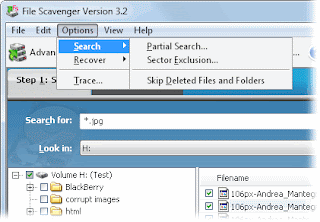
File Scavenger is a Windows file undelete and data recovery utility for NTFS and FAT/FAT32 volumes. It can recover files that were damaged by virus or accidentally deleted from Windows Explorer, the Recycled Bin, command line window, or a network share along with original folder names and file Create and Modified dates. It supports reformatted volumes or broken hardware/software RAID volumes as well as file compression, dynamic disks, alternate data streams, sparse files, Unicode file names and more. With the trial version only 64KB or smaller files can be recovered. File Scavenger offers 3 different search modes, one for quick access to recently deleted files, one for exhaustive search and also a defunct volume search that can even recover files from compromised striped and RAID volumes. We tested the product on a machine that was reformatted a few days ago, and safely recovered some of the files, old desktop shortcuts and more. File Scavenger can be installed or used in portable mode.
- Recovers deleted files.
- Recovers files from corrupt, deleted or reformatted partitions.
- Recovers files with the original filename, folder and dates.
- Supports hard disks, floppy disks, ZIP disks, memory sticks, flash cards, RAIDs, and more Runs on all Windows versions.
- Supports both NTFS and FAT/FAT32.
- Available in English, German and Japanese.
- Reconstructs broken RAIDs and spanned volumes.


Recovered from a reformatted or corrupted volume
With File Scavenger files can be recovered from a reformatted or corrupted volume. This is even possible when the volume has been deleted and its original position and size are unknown. File Scavenger can scan an entire physical hard drive to look for traces of defunct volumes.
Bad sectors and badly corrupted partitions
File Scavenger uses advanced algorithms to transparently handle disks with many bad sectors and badly corrupted partitions. The software can be installed on a hard drive or run from a floppy disk. To run File Scavenger, you must log on as a system administrator to the computer where data recovery is intended.
CleanMem cleanmem_v.1.6.0 Download
CleanMem is a memory (RAM) cleaner that improves Windows memory management by releasing memory that is no longer being used by any processes. Unlike some other tools, CleanMem will never release memory that is still being used, therefor it will not interfere with any of your programs. The program can be scheduled to clean your memory at regular intervals and also provides an optional system tray monitor that allows you to keep an eye on RAM usage and release memory with the click of a button. Advanced users can also limit memory cleaning to specific processes, exclude processes from being cleaned and keep a log file of cleaning actions. CleanMem works very well, we found it to be quite useful to control applications that build up large amount of memory (i.e Firefox) but don`t clean up after themselves. Portable, no installation required.
(Please Note: If your anti virus says it found a virus of any kind please know this is a false alarm. You can use www.virustotal.com to also see what other antivirus software says. There are no viruses in any of the programs on this site. If your anti virus says it has one please submit the file in question to your anti virus maker, they will then scan the file themselves, see the program or setup is clean and update there virus def's to not cause the false alarm.)

Works on Windows 2000, XP, 2003, Vista , 2008, & Win7 (32bit & 64bit)
Multilingual contents filtering - Anti-Porn supports real-time filtering or blocking porn websites, which is writed in English, Japanese, Korean, Russian, German, Franch, Spanish, simplified Chinese, traditional Chinese.AI to restrict games - Anti-Porn can determine which program is a game by itself. The parents needn't to add any game to a blacklist. Hide completely - You could not find Anti-Porn whether in the explorer or in the task manager. Everyone could not close or remove Anti-Porn without password.

Anti-Porn Parental control software Features
*Filter out porn websites - Anti-Porn parental control has blocked ten thousands of porn websites.Besides,you can predefine websites you don't let kids visit by yourself.
* Update online - Library of porn websites updates weekly.
* Realtime filter - Realtime porn-filter technique can filter any porn website,which appears recently.* Close before Display - Anti-Porn parental control check the whole contents of webpage quickly,and will close the forbidden webpage before kids see it.
Hide/encrypt any folder including flash disk and removable hard disk for protection with this software.
Kaka Folder Protector is a powerful and easy-to-use program for protecting your files. It can hide/encrypt any folder including flash disk and removable hard disk.


Description:
- AMP WinOFF is an utility for scheduling the shutdown of Windows computer, with several shutdown conditions and fully configurable. Some of its Features are:
- Several modes/conditions for shutdown planification:
- At certain date/time (e.g. 12:00 AM).
- After a period of time (e.g. 1 hour and 15 minutes).
- When there isn't user activity (i.e. no mouse/keyboard input).
- When there isn't CPU activity.

- Option of set several conditions at the same time for the planification. Examples:
- Shut down at 08:00 PM or when there is no user activity for 15 minutes.
- Shut down when the CPU load is below than 1% and the network transfer is below than 1Kb/s.
- Several types of shutdown: power off, restart, close session, lock session, administrative shutdown/restart, sleep and hibernate.